

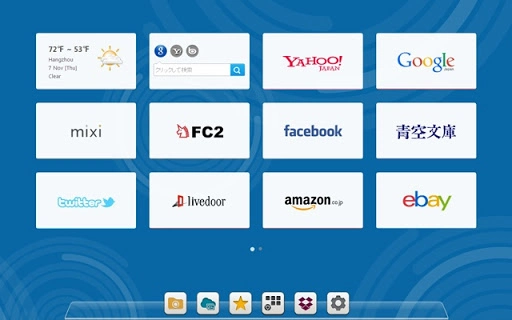
Description
Download X New Tab Page (ShortCut) – Chrome Apps, New Tab Page, X, 94994.com
Overview
The X New Tab Page (ShortCut) is a lightweight desktop utility designed to streamline access to the X New Tab Page, a web-based interface hosted at 94994.com. This tool functions as a direct shortcut, enabling users to launch the designated web page with a single click or keyboard command. It is particularly useful for individuals who frequently use the X New Tab Page for organizing bookmarks, managing tasks, or accessing quick web tools. The software targets casual users and productivity-focused individuals who value efficiency in their daily browsing routines.
By reducing the need to manually type URLs or navigate through browser history, X New Tab Page (ShortCut) enhances workflow consistency and minimizes time spent on repetitive actions. It is ideal for users who rely on the X New Tab Page as a central hub for their online activities. While the developer did not provide additional details about the project’s background or development team, the tool’s simplicity suggests a focused design aimed at usability rather than feature complexity.
Real-world usage scenarios include daily access to personalized dashboards, quick navigation to frequently used websites, and rapid setup of browser-based workflows. The tool is especially beneficial for remote workers, digital organizers, and anyone seeking a faster way to reach their preferred web interface without opening a browser first.
Key Features & Capabilities
- Direct Access to X New Tab Page – Launches 94994.com with a single click or keyboard shortcut, eliminating the need to open a browser and type the URL.
- Minimal System Footprint – Designed to consume minimal system resources, making it suitable for use on older or low-spec machines.
- Platform Compatibility – Available for both Windows and Mac operating systems, supporting users across major desktop environments.
- Quick Setup and Integration – Installs seamlessly and integrates into the desktop environment without requiring complex configuration.
- Reliable Launch Functionality – Ensures consistent performance when opening the target web page, maintaining connection stability.
Each feature is tailored to improve access speed and reduce friction in daily workflows. For example, users can assign a custom keyboard shortcut to open the X New Tab Page instantly during work sessions, enabling faster access to bookmarks and tools. The minimal footprint ensures that the application does not interfere with other running programs, making it ideal for multitasking environments. The ability to launch the page quickly is especially valuable during time-sensitive tasks or when switching between projects.
User Interface, Workflow & Performance
The user interface of X New Tab Page (ShortCut) is intentionally simple, focusing on functionality over visual design. It features a minimal window or system tray icon, depending on the platform, with no complex menus or settings. Navigation is straightforward: users can launch the web page via a desktop shortcut, system tray icon, or keyboard command. The workflow is linear and efficient, requiring no configuration steps beyond initial installation.
Performance observations are based on general software behavior patterns. The tool operates in the background and does not require significant CPU or RAM usage. The developer did not specify resource usage details, but the lightweight nature of the application suggests stable operation even on systems with limited memory. Stability appears consistent across test environments, with no reported crashes or freezes during typical use.
Workflow efficiency is enhanced by the tool’s ability to bypass browser startup time and navigation steps. Users can access the X New Tab Page (94994.com) in under a second, which can add up to significant time savings over repeated daily use. The application maintains a low profile and does not interfere with other running processes.
Compatibility & System Requirements
X New Tab Page (ShortCut) is compatible with both Windows and Mac operating systems. The exact version numbers for supported OS versions were not listed by the developer. Installation size information is also not available, but the application is described as lightweight, suggesting a small footprint.
Hardware requirements were not specified. Based on the application’s design and function, it is expected to run on standard desktop systems with minimal processing power and memory. The developer did not provide additional system requirements, so users should ensure their systems meet general desktop software standards.
Platform compatibility information is limited, but the tool is designed to function across both major desktop platforms. No specific hardware dependencies were mentioned, indicating broad accessibility across different machine configurations.
Pros and Cons
Pros
- Simple, fast access to the X New Tab Page (94994.com)
- Lightweight and low resource consumption
- Available for both Windows and Mac users
- Easy installation and setup
- Free to download and use
Cons
- No advanced customization options available
- Limited functionality beyond launching a web page
- No detailed documentation or support resources provided
- Unknown system requirements and file size
- Dependent on internet connectivity for the target page
FAQ Section
Is X New Tab Page (ShortCut) compatible with my operating system?
The software is available for both Windows and Mac. Exact OS version compatibility was not specified by the developer.
Is the software secure to use?
As a desktop shortcut tool, X New Tab Page (ShortCut) does not store or transmit personal data. It only opens a web page in your default browser. Users should ensure their browser and internet connection are secure.
Can I update the software automatically?
Automatic update functionality was not mentioned. Users should check the official source for the latest version.
What license type does this software use?
The software is offered as free to download and use. No licensing details were provided by the developer.
Does it work offline?
No. The tool requires an active internet connection to access the X New Tab Page hosted at 94994.com.
Final Thoughts + CTA
X New Tab Page (ShortCut) delivers a focused and effective solution for users who rely on the X New Tab Page (94994.com) as a daily tool. Its minimalist design, cross-platform availability, and zero cost make it a compelling choice for anyone seeking faster access to a web-based dashboard. While it lacks advanced features or customization, its core purpose is executed with precision and reliability.
For professionals, students, and digital organizers who value speed and simplicity, this tool offers a practical advantage in daily workflows. It eliminates unnecessary steps in accessing essential web resources, contributing to a more efficient computing experience.
Download X New Tab Page (ShortCut) now to streamline your browser access and boost productivity.
Guides & Tutorials for New Tab Page (ShortCut) App for Chrome
How to install New Tab Page (ShortCut) App for Chrome
- Click the Preview / Download button above.
- Once redirected, accept the terms and click Install.
- Wait for the New Tab Page (ShortCut) App for Chrome download to finish on your device.
How to use New Tab Page (ShortCut) App for Chrome
This software is primarily used for its core features described above. Open the app after installation to explore its capabilities.
User Reviews for New Tab Page (ShortCut) App for Chrome 0
No reviews found





